Note: This blog post is a transcript of my talk at GodotCon. The conversational tone reflects the original presentation, aimed at walking through the work of bringing hardware ray tracing into the Godot engine.
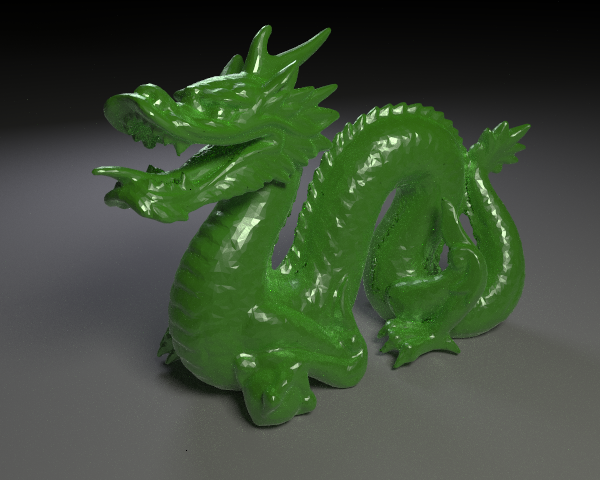
During the pandemic I went deep into ray tracing. I wrote a software renderer from scratch, implemented a path tracer, and learned about techniques like importance sampling and multiple importance sampling. With these I was able to render really cool images, like the Stanford dragon below.
Why ray tracing
With ray tracing you can render beautiful pictures. The technique simulates the physics of light accurately, so you get effects that are difficult to fake: soft shadows, global illumination, reflections, and refractions.
At a certain point I wanted to share this with more people, but my code was just a prototype, and nobody would care about my prototype. This is where Godot comes in.
Why Godot
Godot is a game engine, and a lot of friends and colleagues use it. It ticks many boxes for me:
- It is popular.
- It is open source under the MIT license.
- It is multiplatform.
- It does not require royalties for publishing your game.
- It is just a single file that you put on your desktop. You double-click, and it works.
- And most importantly, it compiles in a few minutes on my machine. If you have ever compiled other game engines, you know what that means for productivity.
A couple of years ago, however, Godot had no support for hardware ray tracing. I thought I could help with that. How cool would it be to have something like this in Godot?
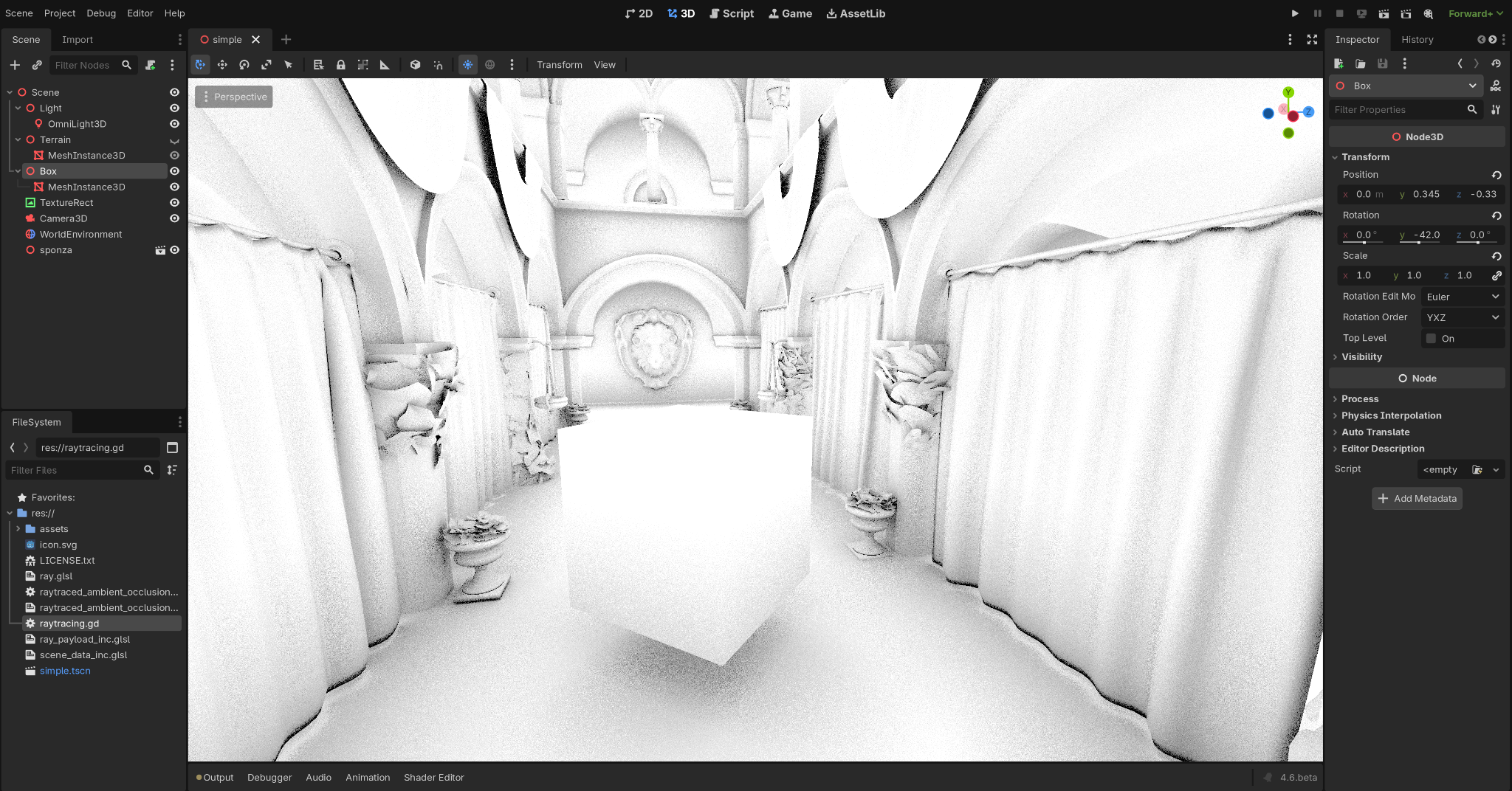
The picture shows a technique called ray traced ambient occlusion, which tries to estimate where light struggles to reach. You get nice soft shadows below a cube, or behind curtains, where the light cannot easily get in.
Adding Vulkan ray tracing to Godot. How hard could it be?
That was the challenge. I had a bunch of Vulkan code in my prototype, which was the result of following the NVIDIA ray tracing tutorial. You cannot just take that code and drop it into Godot, it does not work like that.
At a high level, to do ray tracing you need to do four things:
- Create a bounding volume hierarchy.
- Create a ray tracing pipeline.
- Create the shader binding table.
- Trace rays.
Let me go into a bit more detail on each.
Bounding volume hierarchies
A bounding volume hierarchy is boxes containing boxes containing geometries. What problem does it solve?
When you want to ray trace something, you shoot a ray and look for an intersection. Your scene may contain many geometries, and naively you would iterate through all of them looking for an intersection with the ray. That is a linear algorithm, and it does not scale.
Instead, you can subdivide the space. You check for intersection on each cell of your space, and if you hit a cell, you go down and look for the geometries inside it. The algorithm becomes logarithmic.
You can also subdivide the space within the space. You create a top level acceleration structure (TLAS) at the top, and bottom level acceleration structures (BLAS) underneath. Geometries live inside the BLAS, and instances of those BLAS are referenced from the TLAS.
In pseudocode, you iterate through all the pixels in your framebuffer. You generate a ray and look for an intersection by traversing the bounding volume hierarchy. You either get an index of the geometry you hit, or you do not hit anything, which is a miss. If you hit a geometry, you can shade it: pick the material and, according to the lighting model, get a pixel colour on the screen.
for pixel in framebuffer:
    ray = generate_ray(pixel)
    i = intersects(ray, bvh)
    pixel.color = shade(ray, geometries[i])
Ray tracing pipeline
The ray tracing pipeline is tied to the GPU, and there are hardware modules for it.
You generate a ray and trace it by looking for intersections in the bounding volume hierarchy. Inside the GPU this is a data structure, and the traversal is accelerated by the hardware. That is why we call it an acceleration structure.
If we have an intersection, we ask: is this the closest geometry to the origin of the ray? If so, we have a closest hit, and we run a shader to compute the colour. If there is no hit, we have a miss, and we still want to do something, for example return the colour of the sky. For that we use a miss shader.
  flowchart TD
    RG[Ray Generation]
    AST[Acceleration Structure Traversal]
    RG -->|Trace Ray| AST

    INT[Intersection]
    AH[Any Hit]
    AST --> INT
    INT --> AH
    AH --> AST

    MISS[Miss]
    CH[Closest Hit]
    AST -->|Hit? No| MISS
    AST -->|Hit? Yes| CH
Fitting ray tracing into Godot
I have this Vulkan code, I want to put it in Godot, but I cannot just drop it in. There are constraints:
- I should not break the engine.
- It should fit Godot's rendering abstractions.
- It should perform automatic synchronisation via the render graph.
- I need to expose this new ray tracing API to the user via scripting.
- It should be multi-backend friendly. Godot does not only have Vulkan, it also supports Direct3D 12 and Metal. The interface should be unified.
The end goal
Brace yourself, I am going to show you some code. This is what I would like the final API to look like. If you are familiar with GDScript and the RenderingDevice object, you probably already use the parts at the top. The functions highlighted below are new and exposed to you.
var rd = RenderingServer.create_local_rendering_device()

# New: create a bottom level acceleration structure for the scene geometries.
var blas = rd.acceleration_structure_create_bottom_level(geometries)

# New: create a top level acceleration structure with one or more instances.
var tlas = rd.acceleration_structure_create_top_level(instances)

# Record commands.
var rtl = rd.raytracing_list_begin()
rd.raytracing_list_bind_pipeline(rtl, pipeline)
rd.raytracing_list_bind_uniform_set(rtl, uniform_set, 0)
rd.raytracing_list_trace_rays(rtl, width, height)
rd.raytracing_list_end()
Where GPU rendering lives in the engine
So, what code do I touch? I came up with the following picture. There are a few classes in the Godot source that matter:
RenderingDeviceRenderingDeviceGraphRenderingDeviceDriver
  ---
config:
  class:
    hideEmptyMembersBox: true
  layout: elk
  elk:
    nodePlacementStrategy: SIMPLE
---
classDiagram
    class RenderingDevice["RenderingDevice (RD)"]
    class RenderingDeviceGraph["RenderingDeviceGraph (RDG)"]
    class RenderingDeviceDriver["RenderingDeviceDriver (RDD)"]
    class RDDVulkan
    class RDDD3D12
    class RDDMetal

    RenderingDevice *-- RenderingDeviceGraph
    RenderingDevice *-- RenderingDeviceDriver
    RenderingDeviceGraph *-- RenderingDeviceDriver
    RenderingDeviceDriver <|-- RDDVulkan
    RenderingDeviceDriver <|-- RDDD3D12
    RenderingDeviceDriver <|-- RDDMetal
The RenderingDeviceDriver is a polymorphic type. It is a unified interface over the graphics APIs available to us, with concrete implementations for Vulkan, Direct3D 12, and Metal.
In the middle is the RenderingDeviceGraph. I really like this class. It is the authority on synchronisation. It is responsible for recording commands and tracking resource usages, and it generates barriers automatically based on those usages, which is incredibly useful.
What are barriers?
The GPU is highly parallel hardware. It tries to do everything at once if it can. Sometimes, though, you do not want that: you want to do something first, then something after that finishes. A GPU barrier is the way to tell the GPU "please wait for this operation to finish before starting the next one".
I do not need to issue these barriers myself. The render graph generates them for me. That is why I like this class.
How the graph works
The graph is a directed acyclic graph. Nodes represent GPU operations such as uploading data to a buffer, running a render pass, or running a compute pass. Edges between nodes are resource usages: do I read from the resource, do I write to it, do I use it for a specific reason?
With this information, the RenderingDeviceGraph detects dependencies between operations and resources, and generates barriers for me. There is a nice blog post on the Godot Engine website by DarioSamo, GPU synchronisation in Godot 4.3 is getting a major upgrade, that I recommend if you want a better understanding of the topic.
  flowchart TD
    a((a))
    b((b))
    c((c))
    d((d))
    e((e))

    a --> b
    a --> c
    a --> d
    a --> e
    b --> d
    c --> d
    c --> e
    d --> e
The Rendering Device
At the very top is the RenderingDevice. This is the GPU API exposed to Godot developers. It is responsible for creating GPU resources and recording commands, which it does by delegating to the classes on the right. Anything that involves command recording and synchronisation goes through the RenderingDeviceGraph. Anything related to resource management goes through the RenderingDeviceDriver.
Ray tracing hello world
The idea is to do the ray tracing hello world: one triangle, one ray per pixel. What is the minimum set of changes needed to get a ray-traced triangle on the screen?
Here is the road map I ended up with:
- Extensions and properties.
- New types and APIs available to the user.
- Acceleration structures.
- Ray tracing shaders.
- Recording commands.
Vulkan requirements
Not every GPU supports ray tracing. These features are quite new in the industry, and in Vulkan the ray tracing API is an extension, which means it is not enabled by default. I need to query the GPU: do you support acceleration structures? Do you support the ray tracing pipeline? Do you have all the requirements I need?
If yes, the new Godot APIs become available. Otherwise, they do not. There are also a few properties I need to query for the size of objects, alignments in memory, and similar details, which the user will not have to care about. I take care of those.
A new pipeline type
So far Godot had two pipelines: rasterisation for drawing things on the screen, and compute for generic computation. Now we have a new one for ray tracing.
Together with the pipeline come new shader stages:
- raygen shader: how we generate rays. Typically you generate rays at the camera position, shooting in the camera's view direction.
- miss shader: what happens when the ray does not hit any geometry. Maybe you want the colour of the sky.
- closest hit shader: what happens when the ray hits the closest geometry.
- any hit shader: invoked every time the ray hits something, not necessarily the closest. Useful for things like transparency.
- intersection shader: by default the GPU has a hardware module to accelerate ray-triangle intersection, which is super fast. If you want a different geometry, for example a signed distance function, you can provide your own intersection shader. I think that would be very cool.
I create the shader stages, group the closest hit and any hit shaders, and together they form a ray tracing pipeline.
Where to store the objects
At this point I have a question: where do I put my objects? I have all these Vulkan objects I created, and I need to specify their lifetime. Who creates them, who destroys them?
There is a nice pattern in the Godot source code: the concept of an owner. The owner is an object that holds GPU resources. You put your object into the owner and you get back a lightweight ID, an RID, which is just an access key you can use later to retrieve the object.
I ended up creating an owner for acceleration structures and an owner for ray tracing pipelines.
New engine APIs
These are the new functions available via the RenderingDevice. This is the part that you care about. The API is still experimental: the function names may change, the parameters may change. But so far we have functions for:
- Creating BLAS and building them.
- Creating TLAS and building them.
- Creating the ray tracing pipeline.
- Recording commands, which I will show in a moment.
The instances buffer
The instances buffer is an interesting object. It is the way we build the TLAS.
To build a BLAS we just need a collection of geometries, and we put those into the BLAS. The TLAS is different: we cannot just put a BLAS into a TLAS directly. We may want to use the same BLAS several times, instanced at different positions in space.
This is done via the instances buffer: a reference to a BLAS plus a Transform3D so we can place it in the world.
  flowchart TD
    BLAS[BLAS]
    T3D[Transform3D]
    IB[InstancesBuffer]
    TLAS[TLAS]

    BLAS -->|*| IB
    T3D -->|*| IB
    IB --> TLAS
The scratch buffer
The scratch buffer is needed when we build acceleration structures. The GPU tells us: "I need some memory where I can do my computation while building the acceleration structure, please give it to me." You ask, "Can you not figure that out yourself?" and the answer is no. You specify it, and the GPU can build the acceleration structure.
You, the user, never have to care about this. I take care of it for you.
Resource usages
Earlier I mentioned that the render graph tracks operations and resource usages. For ray tracing the operations are:
- Building acceleration structures.
- Tracing rays.
The resource usages are things like:
- When building a TLAS, the BLAS is used as a build input.
- When tracing rays, we read from the memory representing the TLAS.
From these, the render graph generates the appropriate Vulkan barriers for me. Very cool.
Ray tracing shaders
This is the part where I introduced new markers in source files: markers for raygen, miss, closest hit, any hit, and intersection. Below is an example of a single source file containing three shaders: a raygen shader, a miss shader, and a closest hit shader.
#[raygen]
#version 460
#extension GL_EXT_ray_tracing : require

layout(set = 0, binding = 0) uniform accelerationStructureEXT tlas;
layout(set = 0, binding = 1, rgba8) uniform image2D output_image;

layout(location = 0) rayPayloadEXT vec3 payload;

void main() {
    vec3 origin = vec3(0.0);
    vec3 direction = vec3(0.0, 0.0, 1.0);
    traceRayEXT(tlas, gl_RayFlagsOpaqueEXT, 0xFF,
                0, 0, 0, origin, 0.001, direction, 10000.0, 0);
    imageStore(output_image, ivec2(gl_LaunchIDEXT.xy), vec4(payload, 1.0));
}

#[miss]
#version 460
#extension GL_EXT_ray_tracing : require

layout(location = 0) rayPayloadInEXT vec3 payload;

void main() {
    payload = vec3(1.0, 0.0, 0.0); // red on miss
}

#[closest_hit]
#version 460
#extension GL_EXT_ray_tracing : require

layout(location = 0) rayPayloadInEXT vec3 payload;

void main() {
    payload = vec3(0.0, 1.0, 0.0); // green on hit
}
The raygen shader generates a ray at the origin pointing along the z-axis. There is probably a bug somewhere in there. The miss shader returns red when the ray hits nothing. The closest hit shader returns green when the ray hits something.
The shader binding table
The shader binding table was a headache for me. It is an object the GPU wants when you build your ray tracing pipeline. It does not contain shaders directly, it contains shader group handles. When you build it, you also have to handle the size of the handles, their alignment in memory, and the strides of each region. It is complicated stuff that you, the user, should never have to care about.
Command list
This is how Godot records commands: they are pushed into a list. There is a draw list for the rasterisation pipeline, a compute list for the compute pipeline, and now a ray tracing list for the ray tracing pipeline.
In practice that is just a bunch of new functions on the RenderingDevice, all available from GDScript. We have raytracing_list_begin and raytracing_list_end. Between those two, you bind objects, push data, and trace rays.
The minimal sample, in full
Going back to our minimal sample, this time with the full picture:
var rd = RenderingDevice.new()
assert(rd.has_feature(RenderingDevice.SUPPORTS_RAYTRACING_PIPELINE))

# Create BLAS and TLAS for a mesh.
var blas = rd.blas_create(
    [geometry],
    RenderingDevice.ACCELERATION_STRUCTURE_GEOMETRY_OPAQUE_BIT)
var tlas = rd.tlas_create(1)

# Build acceleration structures.
rd.blas_build(blas)

var instance = RDAccelerationStructureInstance.new()
instance.blas = blas
rd.tlas_build(tlas, [instance])

var raylist = rd.raytracing_list_begin()

# Bind pipeline and uniforms.
rd.raytracing_list_bind_raytracing_pipeline(raylist, raytracing_pipeline)
rd.raytracing_list_bind_uniform_set(raylist, uniform_set, 0)

# Trace rays.
var width = get_viewport().size.x
var height = get_viewport().size.y
var depth = 1
rd.raytracing_list_trace_rays(raylist, 0, sbt, width, height, depth)

rd.raytracing_list_end()
Creating the ray tracing pipeline
How do you create the pipeline object? You take a GLSL shader, compile it to SPIR-V, create a shader object from the SPIR-V, group the resulting stages into hit groups, and call the pipeline create function. It looks convoluted, but you will figure it out.
func _initialize_raytracing_pipeline():
    # Load shaders and create raytracing pipeline
    var shader_file = load("res://ray.glsl")
    var shader_spirv = shader_file.get_spirv()
    var shader = rd.shader_create_from_spirv(shader_spirv)

    var pipeline_shader = RDPipelineShader.new()
    pipeline_shader.shader = shader

    var hit_group = RDHitGroup.new()
    hit_group.closest_hit_shader = pipeline_shader

    var raytracing_pipeline = rd.raytracing_pipeline_create(
        [pipeline_shader],
        [pipeline_shader],
        [hit_group],
        1)
Creating uniforms
Uniforms are how we push data to the GPU. In my sample I have two: one for the output image, and one for the TLAS, which is the object I use to traverse the hierarchy and look for intersections.
And here we have our nice triangle. The triangle is green, meaning the ray hit the geometry. Red means the ray missed.
func _initialize_uniforms():
    # Storage image uniform
    var image_uniform = RDUniform.new()
    image_uniform.uniform_type = RenderingDevice.UNIFORM_TYPE_IMAGE
    image_uniform.binding = 0
    image_uniform.add_id(output_image)

    # Acceleration structure uniform
    var as_uniform = RDUniform.new()
    as_uniform.uniform_type = RenderingDevice.UNIFORM_TYPE_ACCELERATION_STRUCTURE
    as_uniform.binding = 1
    as_uniform.add_id(tlas)

    uniform_set = rd.uniform_set_create([image_uniform, as_uniform], shader, 0)
The pull request
At this point I felt the implementation had enough code to call it done. I did not want to keep adding more. I wanted to open a pull request that was the minimum set of changes needed to implement this feature, because otherwise it would have been difficult for Godot maintainers to review and difficult for me to iterate on.
Even so, the PR is around 3000 lines of code and accumulated 174 comments, mostly asking for changes. I opened it on November 12, 2024, and it was merged on January 27, 2025. I want to thank the reviewers: Calinou, Mickeon, AThousandShips, DarioSamo, clayjohn, and reduz. Thank you very much for reviewing my code.
Going beyond the minimum: Sponza
On a separate branch, which is not a pull request, I went further. I wanted to take the geometry from a real scene and forward it to the ray tracing pipeline.
I rendered Sponza, but only half of it. Some geometries were missing. I started asking myself: where have those geometries gone? Why are some present and others not? I needed to debug it.
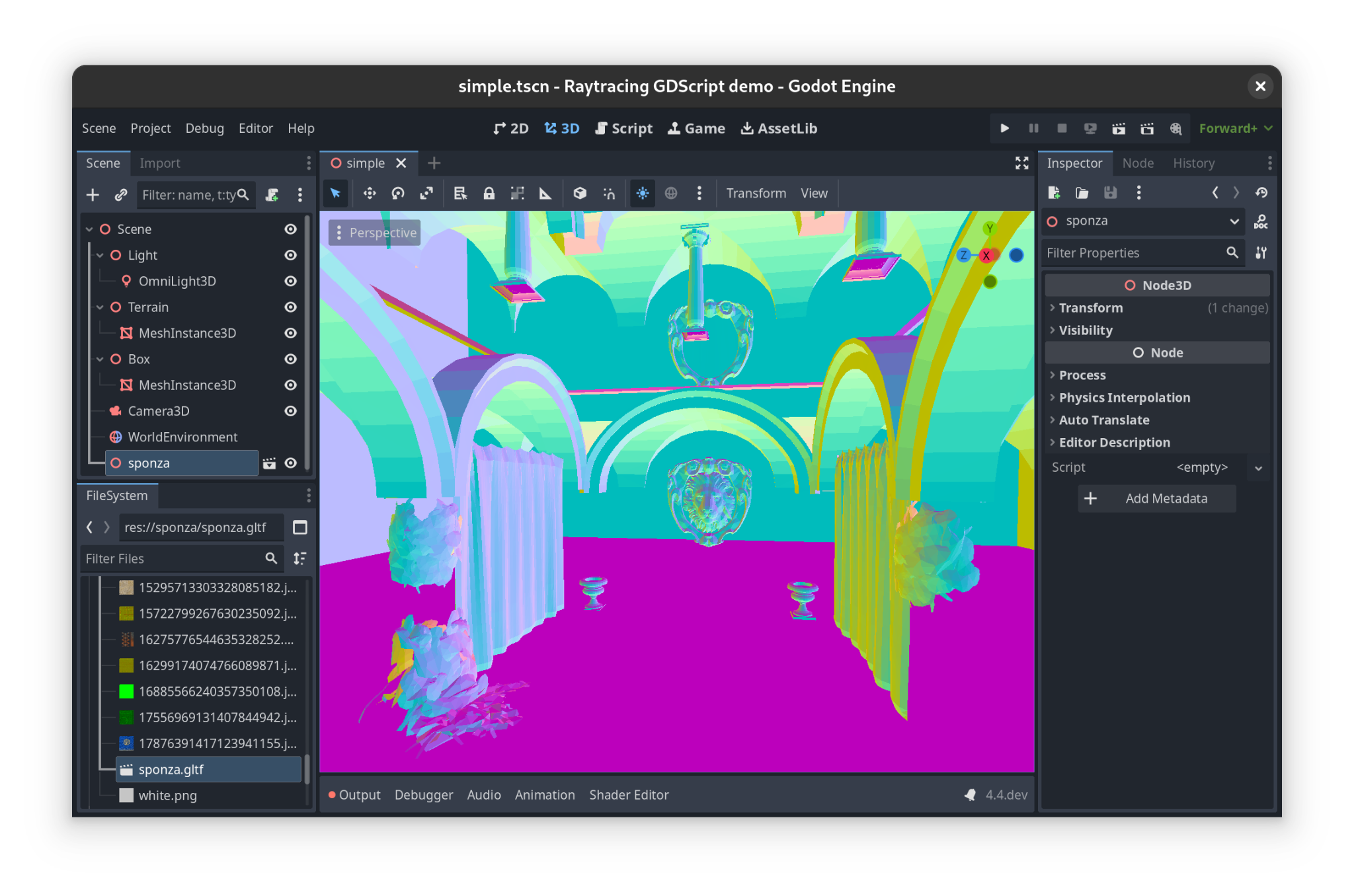
I noticed a weird cube in the middle of the scene. It was not really a cube, there were things inside it.
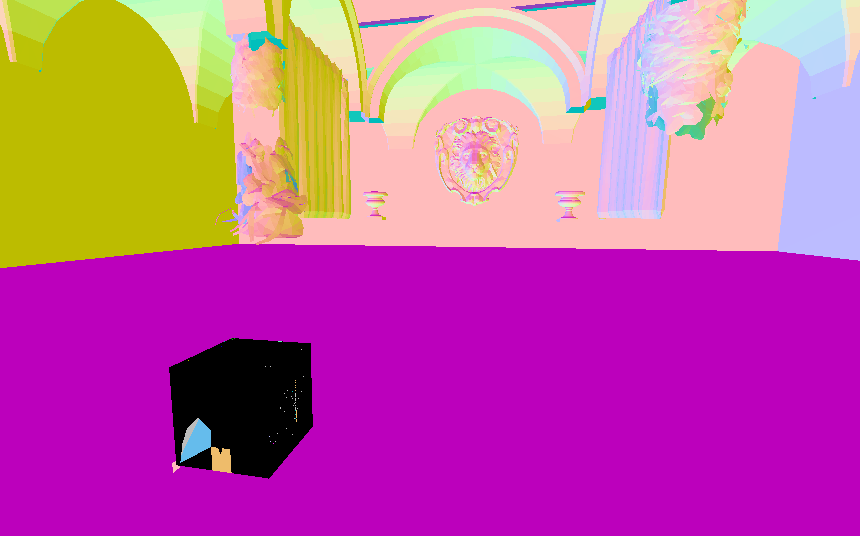
I opened it in a profiler and saw that there were indeed many geometries inside, but the vertex positions were all between zero and one. I scratched my head. Maybe there is some compression going on here?
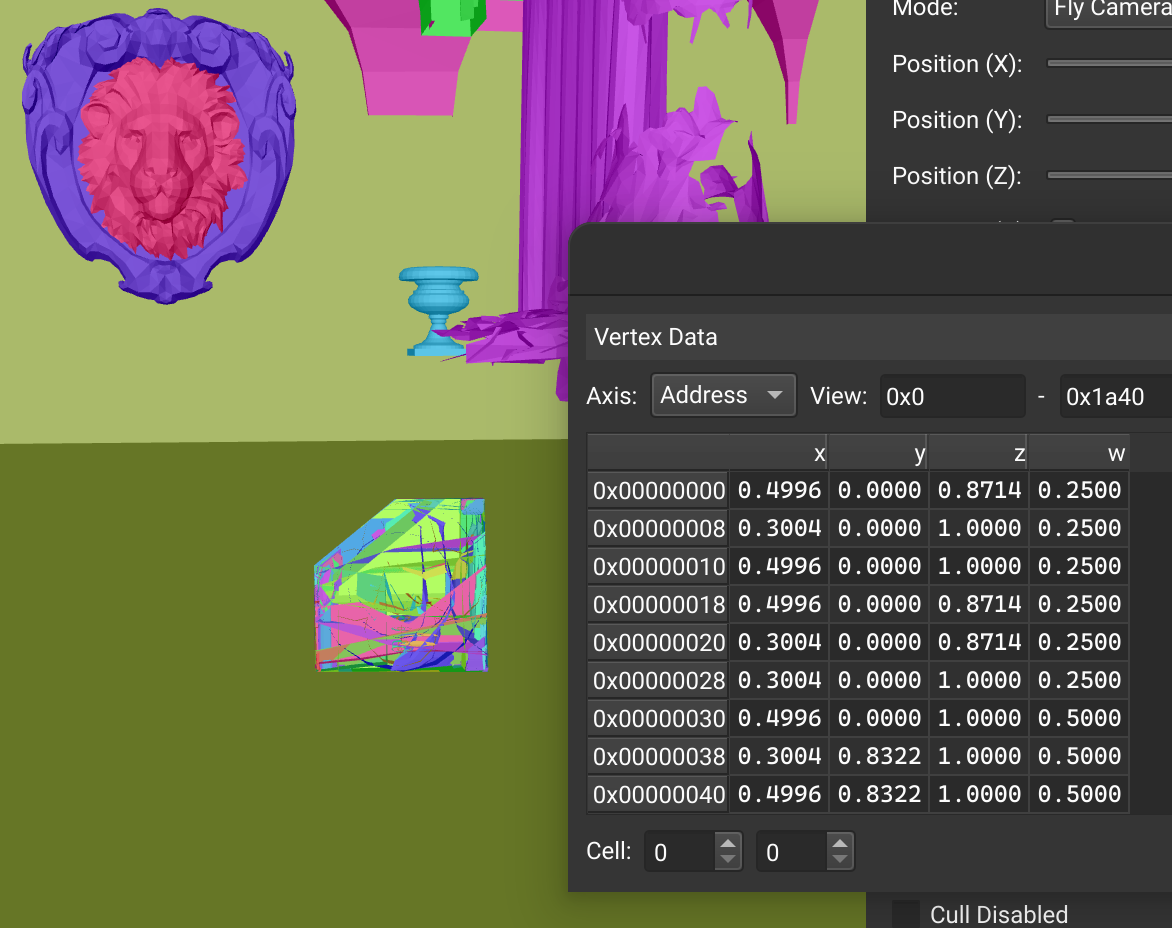
Indeed, Godot compresses vertex attributes when you import a model. I disabled that behaviour, and boom: Sponza was rendered nicely through the ray tracing pipeline.
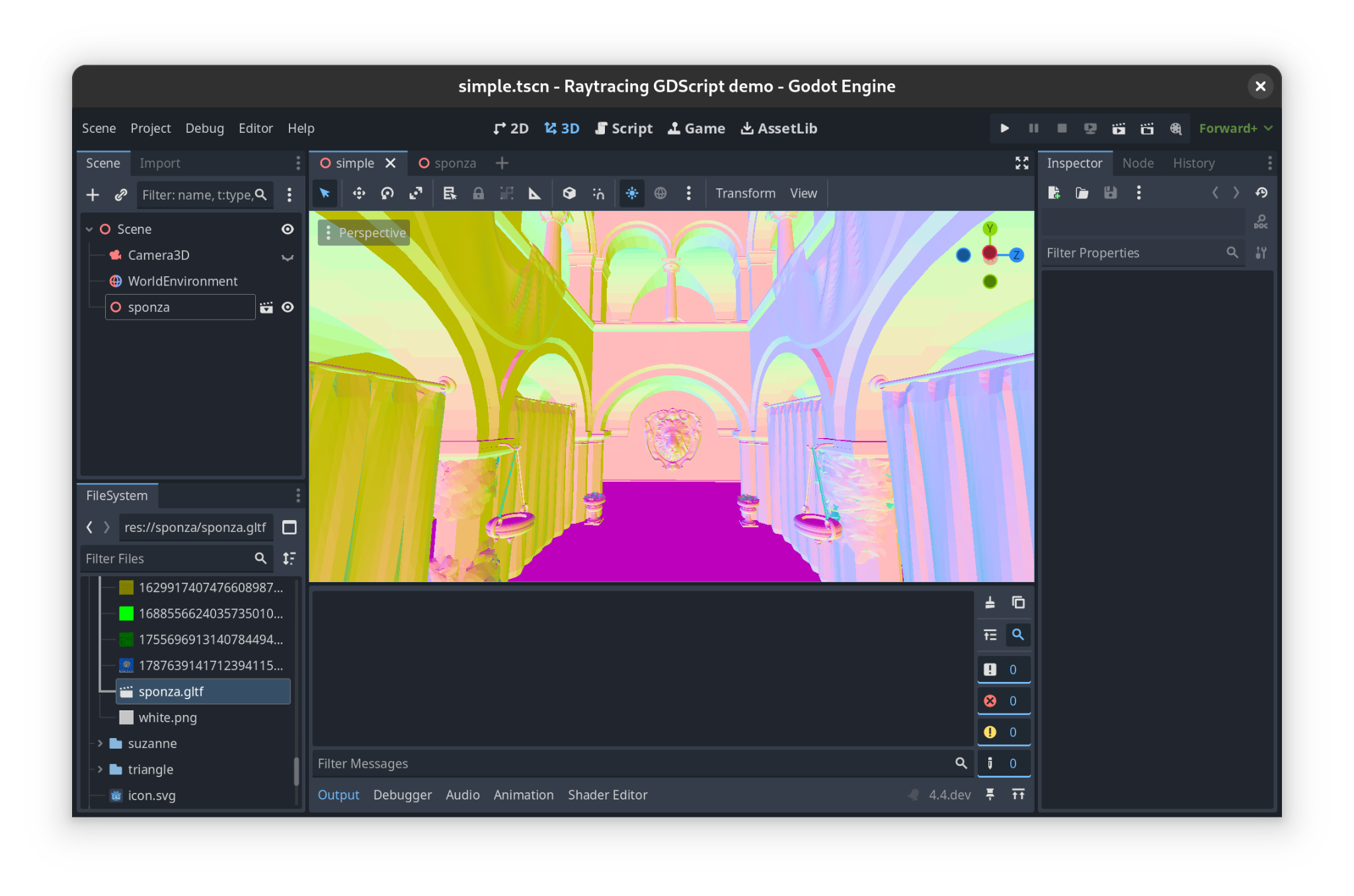
Ray traced ambient occlusion
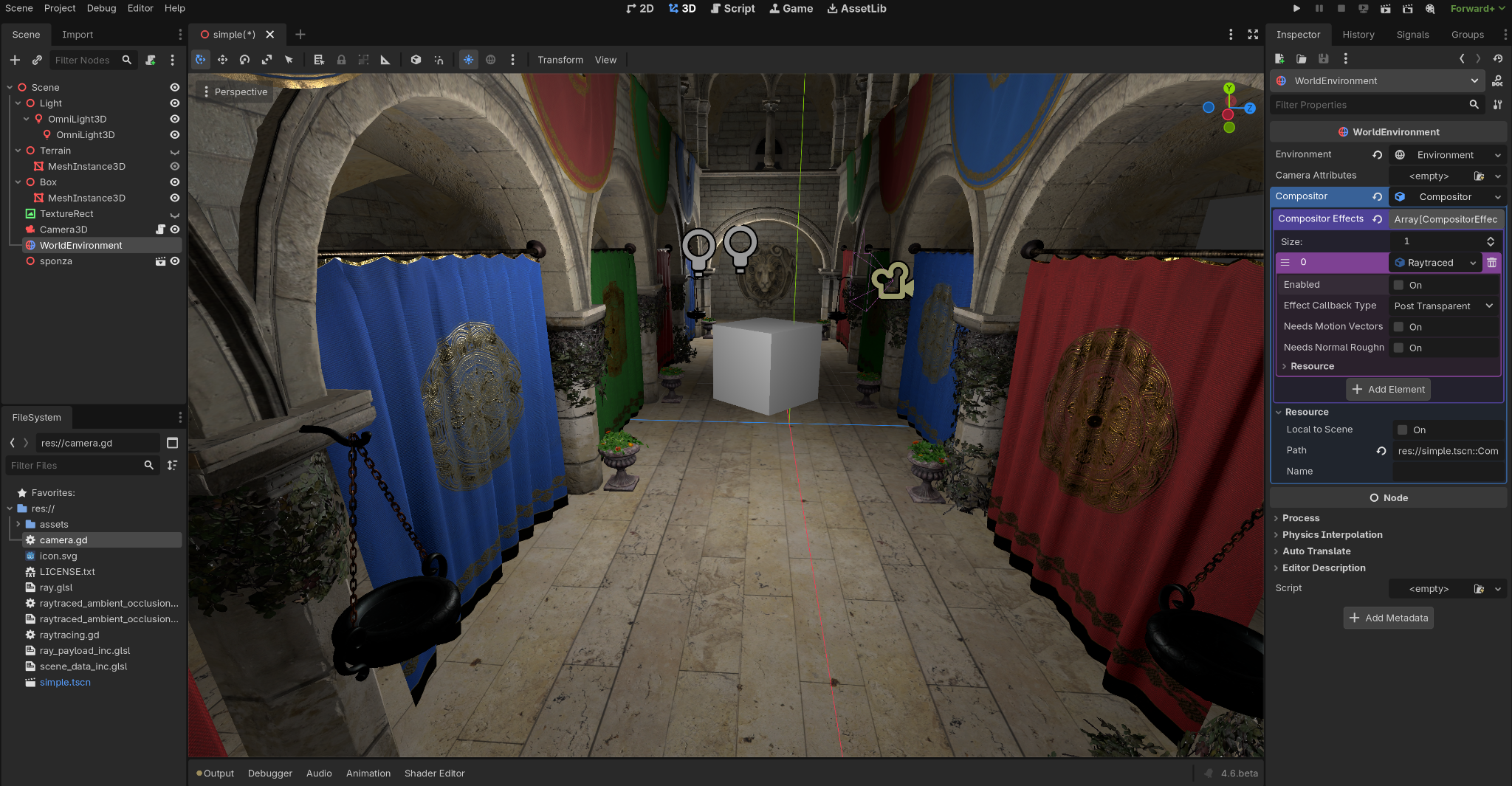
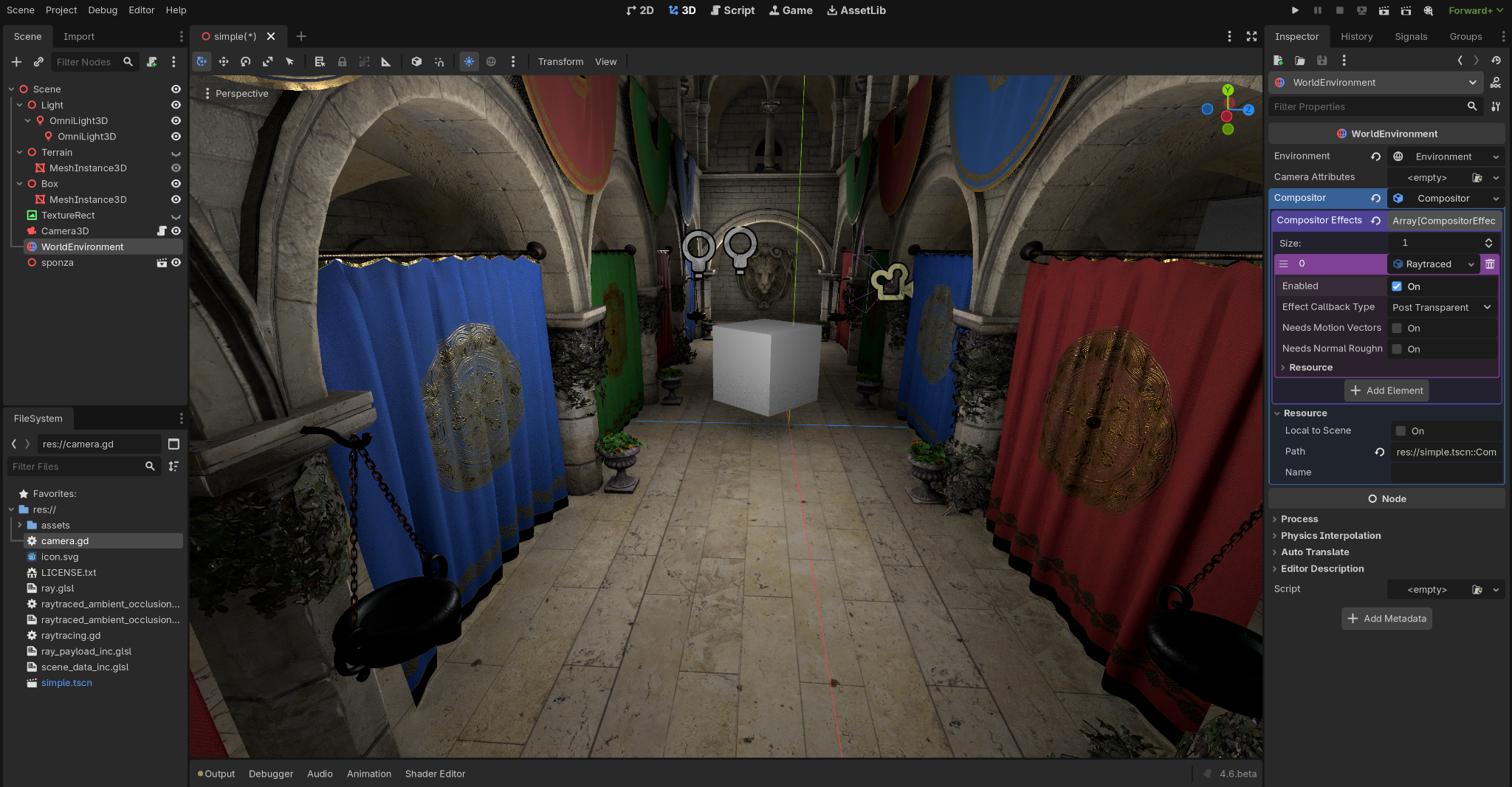
In that screenshot you can also see ray traced ambient occlusion in action. I noticed that Godot has a nice node called WorldEnvironment, and I realised I could use it to add a post-processing step that does ray traced occlusion and composites the result with the default forward-plus pipeline.
So this is forward-plus without ray traced ambient occlusion.
This is forward-plus with it. Look at the difference, especially below the cube, where you can see a nice soft shadow, and behind the curtains, where you now see dark areas where the light struggles to reach. I think it is so nice.
What is next
With this in place, we can do other interesting things:
- Ray traced reflections.
- Custom visibility queries accelerated by the GPU's ray tracing hardware module.
- A hybrid renderer.
- Cinematic rendering.
You tell me.